Same person. Same morning. Two very different texts.
senior-bridge writes every message fresh, from what’s in her profile. Give it a name and “likes family” and you get a polite greeting card. Give it the grandkids’ names, the park she walks in and the way she talks, and you get a friend.
The first text is friendly. The second sounds like someone who knows her. The difference is the profile.
💬 Rather talk it through? Copy our interview prompt into ChatGPT, Claude or Gemini and it will walk you through every step.
Step 1 of 7
Who they are
The basics. Get them right, then move on.
Display name & Nickname
The display name is just for your dashboard. The nickname is what her companion calls her in every message, and it’s the one that matters.
Nickname: (blank)
Nickname: Maggie
Why: “Maggie” sounds like a friend. “Margaret” sounds like the dentist’s office. Use what her family actually calls her.
Mobile phone, Time zone & ZIP code
- Mobile phone: her own cell number. Nothing is sent to it until she texts JOIN from it (step 7).
- Time zone: hers, not yours. A 7 AM “good morning” sent at 4 AM is not a good morning.
- ZIP code: powers her local weather and anything nearby. Maggie’s is 40205.
Why: Without a ZIP code her companion can’t say “supposed to rain this afternoon, so keep that umbrella handy.” Small, local details are what make a text feel like it came from someone nearby.
Step 2 of 7
How to talk with them
Tone
Four warm choices. You’re not picking a brand voice; you’re picking the kind of friend writing to her.
Why: Tone sets how long each text is, how playful, and how much small talk comes before the point.
Faith & the morning verse
Faith decides where the optional morning verse comes from and shapes holiday wishes. None is a perfectly good choice: no religious content at all.
Every verse is copied word for word from a published, public-domain text, never written from an AI’s memory, and the same one won’t come back for a year:
- Catholic
- World English Bible, including Tobit, Wisdom and Sirach
- Protestant
- World English Bible
- Jewish
- The Hebrew Bible (JPS 1917), never the New Testament
- Muslim
- The Quran (Pickthall)
- Buddhist
- The Dhammapada
- Spiritual
- Gentle wisdom from writers like Gibran, Thoreau and Emerson
- None
- No verse and no religious content
One tradition is never swapped for another, and verses about death or judgment are left out. Maggie is Catholic and goes to Sunday Mass, so she has Include a short morning verse on.
Emoji & Companion name
- Use emoji: on by default. Most seniors love them; turn it off if she finds them silly.
- Companion name (optional): a name her companion goes by, like “Dot.” It’s used sparingly: when she asks, after a long gap, and on phone calls. It always says it’s an AI companion, never a person or a relative.
Step 3 of 7
Their world
⭐ This step is the biggest lever. If you only have time to do one step well, make it this one.
Things they love
Comma-separated. Her companion reads this list every time it writes, and draws on it whenever it fits naturally. Names, places and sensory details are gold. Aim for five or more.
Why: “Family” is a word. “Her grandkids, especially Lily and Owen” is a scene her companion can write into.
Topics to avoid
Things her companion will never bring up. If she raises one herself, it will listen kindly.
Why: Even one entry here makes a real difference. Without it, a friendly question can wander somewhere painful.
How they sound (style notes)
Where Loves is what to talk about, style notes is how she sounds. Write it the way you’d describe her to a new friend.
Why: “Doesn’t want pity” alone changes hundreds of messages. Her companion will ask about the hip without making it the center of every conversation.
Family & background
Background her companion uses to understand who’s who. It isn’t recited back to her.
Why: When Maggie says “Anne’s coming by,” her companion knows that’s her daughter, not a neighbor.
Pets
Names and a few words each. They come up in conversation, and they show up in the Sunday Recap comic.
What lights them up Premium
Up to 5 topics her companion researches in the background and weaves into messages: a box score, a saint’s feast day, a bird spotted nearby. The best entries give it a story angle, not just a topic.
How often: Daily for calendar-shaped things like a saint of the day (2 daily topics at most, so it never feels like a news feed). Weekly for teams in season, hobbies and neighborhood news. Only when asked for evergreen interests.
Step 4 of 7
Daily rhythm
Keep it boring. A steady rhythm is what makes a text feel like a friend checking in rather than an app.
About the no-reply alert: if she hasn’t texted back for that long while we keep texting her, the people on her alert list get a gentle heads-up, one follow-up a day later, then nothing more until she replies.
Step 5 of 7
Extras
Optional, and each one can be switched on or off any time on her Schedule tab. You’ll see what they look like in a week with Maggie below.
Step 6 of 7
Who gets alerts
Add yourself first, then up to 3 others. For each person, choose:
- Urgent safety alerts: a fall, a medical emergency, talk of self-harm, a likely scam. Recommended on for everyone.
- Gentle heads-ups: a worrying message, no reply in a while, or a reminder she paused or changed.
- Weekly summary email: how her week went, so your calls can start from “How was Lily’s recital?”
Setting up for yourself? You can name one emergency contact instead. They don’t see your messages or the dashboard. They’re told, by email and (once they’ve texted JOIN) by text, if something serious comes up. They’re also told if you don’t text back for 2 days while we keep writing, so someone checks on you; you can change that or turn it off in your settings. Want a hand? Ted will call you and set it up with you.
Step 7 of 7
They text JOIN
Nothing has been sent yet, and adding her number didn’t sign her up: only she can, from her own phone. The last step shows our number and a short script to read her word for word, or you can print her a card:
“If you’d like friendly check-in texts from Senior Bridge, text the word JOIN to (502) 305-5317 from your phone. They come usually 2 to 5 times a day. Message and data rates may apply. You can text STOP any time to stop them, or HELP for help.”
 Dot · Senior BridgeContact card: tap to save
- Her JOIN switches her on. The dashboard shows a green check, and check-ins start on her schedule.
- She gets a contact card with her companion’s name and our logo, so texts show up from a name she knows.
- She can text STOP any time to stop everything, or JOIN again to come back.
After setup
A week with Maggie
Here’s how the pieces fit together in a real week. Every example below is the kind of text she’d actually get.
-
Monday9 AM
📰 The Golden Years Gazette
Good morning, Maggie! ☕ Crisp start to the week, sweater weather till lunch. This week’s Gazette has a slow-cooker apple crisp and a chair stretch that’s kind to new hips. Enjoy!
senior-bridge.com/gazette/…Weather in plain words, an easy recipe for one or two, a chair stretch, a fun holiday from the week and Louisville happenings, with a large-print PDF to print. If her quiet hours run past 9, it waits until they end.
-
Tuesdayevening
🔎 “Did the Cards win?”
Did the Cards win last night? I fell asleep at halftime!They did, Maggie! 🏀 (the real final score, plus the play everyone’s talking about)It only looks things up when she asks something current, up to 5 times a day. Everyday chat never triggers a search. If a message suggests she might be unwell, it skips the search and answers with care.
-
Wednesdaymorning
📅 An appointment, straight to her calendar
Remind me about the eye doctor Thursday at 10:30. Anne’s driving me.Got it, Maggie: the eye doctor Thursday at 10:30. 👓 So nice of Anne to drive you! Would you like a calendar invite for it? Reply YES, and if you send me the address I’ll add that too, so your phone (and car) can take you there.YESHere’s your calendar invite for the eye doctor, Thursday at 10:30 AM. Tap the link, then Add: senior-bridge.com/cal/…The link opens a large-print page with one big “Add to Calendar” button. If an address is wrong, she can just text the right one and gets an updated invite.
-
Thursdaymorning
🙏 A verse she can trust
Morning, Maggie!! Sun’s out and it’s heading for 70, perfect for a loop around Cherokee Park. 🌤️
“This is the day that the LORD has made. We will rejoice and be glad in it!” (Psalm 118:24)
How did the hip feel when you got up?The words come exactly from the source, so a verse she knows by heart reads the way she knows it.
-
Fridayafternoon
⏸️ Plans change
Pause my pill reminder, I’m at Joan’s till Sunday.Done! I’ve paused your Synthroid reminder until Sunday, and I’ve let your family know. Have a wonderful time with Joan! 💛Reminders you set are never deleted by a text, only paused, and you get a text and email right away. Something she mentioned herself is cancelled only after an “are you sure?” Want it back on? Click Resume on her Reminders tab, or she can text “start it again.”
-
SaturdayPremium
📞 A call on a rainy day
🔊 “Hi Maggie! It’s Dot. It’s so nice to hear from you. What’s on your mind today?”🔊 “Oh, it’s pouring. I was going to walk in the park.”🔊 “That’s a shame! It should clear by tomorrow afternoon. Maybe a few stretches by the window today?”She can call any time, or her companion can call her on the days you choose (she says YES by text first; voicemail gets a short message and one “sorry I missed you” text). Same safety checks as texting, 20 minutes per call, 100 minutes a month. We keep a written transcript, never a recording.
-
Sundayevening
🎨 Her Sunday Recap
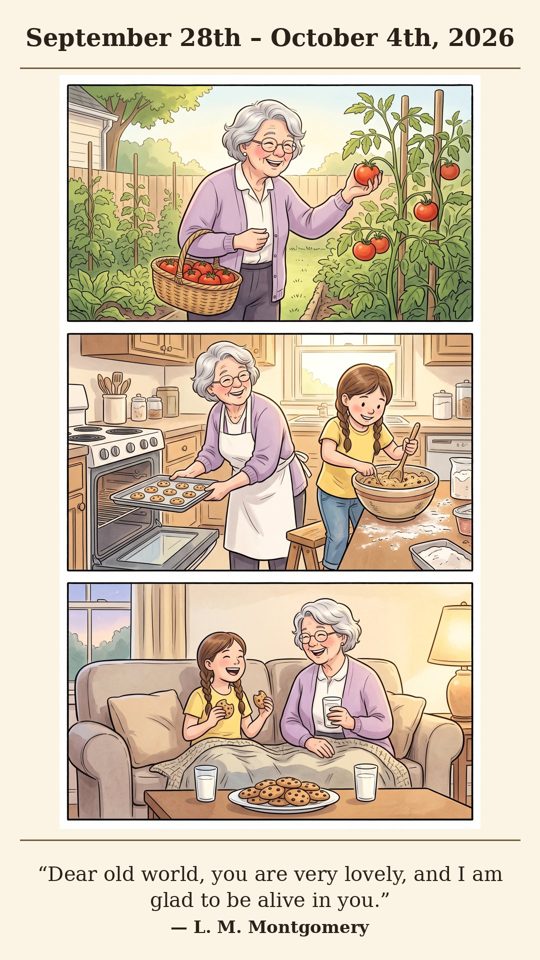 What a lovely week, Maggie! 💛 Your first red tomato of the summer, cookie day with Lily (all six of them 😄), and a cozy cookie break on the couch together. Here’s a little picture of it all.
It arrives a couple of minutes after her Sunday evening check-in (or at 6:30 PM). Hard weeks are never shown; the comic becomes an “uplift” picture of things she loves. Every picture is checked before it’s sent.
Getting her (and Biscuit) drawn right
Leave Appearance empty and the comic shows places, pets and things instead of a person. To have her drawn, use Describe from photo on her Profile tab (tick the consent box first). The photo is turned into a short description and then thrown away; it’s never stored. Read the description and fix anything wrong. One tester’s dark-brown beard was described as “auburn,” and every comic drew it red until the family changed that one word.
Describe pet from photo does the same for pets, so Biscuit looks the same in every panel, week after week.
Reminders that sound like a friend
Add them on her Reminders tab (she can also just text “remind me…”). The title, description and time all feed the message, so a little detail goes a long way.
Description: (blank)
Time: 9:00 AM
Description: Empty stomach, 30 minutes before breakfast. Bottle’s on the kitchen windowsill.
Time: 7:30 AM
Tip: set reminder times outside quiet hours. A reminder due within 15 minutes of a check-in rides along inside it, so she gets one text instead of two.
Short on time?
Let an AI assistant interview you
Some people find it easier to talk it through. Copy this prompt into ChatGPT, Claude or Gemini. It will ask about your loved one a question or two at a time, nudge you for the specific details that matter, and finish with answers laid out to match each setup step, ready to paste in.
You are helping me set up senior-bridge, a friendly text-message companion for an older person in my life. Interview me so I can fill in their profile well. The more specific and personal my answers, the warmer and more personal their texts will be.

How to interview me:
- Ask one or two questions at a time, in a warm, conversational way. Wait for my answer before moving on.
- When an answer is vague (like "family" or "walks"), gently ask for specifics: names, places, smells, sounds, little stories.
- Never invent details. If I don't know or skip something, leave it blank.
- I may use first names only. That's fine; don't ask for last names, addresses or medical records.

Cover these, in this order:
1. Who they are: what I call them, what family calls them (their nickname), their first name, the city or town they live in, their 5-digit ZIP code, and their time zone.
2. How to talk with them: which tone fits best (Warm & chatty, Warm & playful, Warm & dignified, or Warm & quiet), their faith (Catholic, Protestant, Jewish, Muslim, Buddhist, Spiritual, or None), whether they'd like a short morning verse or quote, whether they enjoy emoji, and an optional name for their companion (like "Dot").
3. Their world: at least 5 specific things they love; topics to avoid (politics, losses, health worries, family tension); how they sound and what they'd hate (for example, "doesn't want pity"); the important people in their life and how they're related; and any pets.
4. Interests to follow (optional, premium): up to 5 topics to research and bring up, each with a story angle (not "baseball" but "the Cincinnati Reds, she's followed them since the Big Red Machine days"), and how often: Daily (2 at most), Weekly, or Only when asked.
5. Daily rhythm: a good time for a morning text and an evening text, their bedtime and wake-up time (quiet hours), and how worried I'd be after no reply for 24 hours, 48 hours, 3 days or 4 days.
6. Extras they'd enjoy: answers to current questions (scores, news, opening hours), a Monday newsletter, a Sunday picture of their week, calendar invites for appointments, phone conversations, and a friendly scheduled call.
7. Reminders: medications or routines, each with a short title, a helpful detail (where the bottle is, with food or not) and a time.

When we're done, give me a summary I can copy straight into the setup screens, using exactly these labels:

STEP 1 - WHO THEY ARE
Display name:
Nickname:
ZIP code:
Time zone:

STEP 2 - HOW TO TALK WITH THEM
Tone:
Faith:
Morning verse or quote: Yes / No
Use emoji: Yes / No
Companion name:

STEP 3 - THEIR WORLD
Things they love (comma-separated):
Topics to avoid (comma-separated):
How they sound (style notes, 2-3 sentences):
Family & background:
Pets:
Interests (topic - how often):

STEP 4 - DAILY RHYTHM
Morning check-in:
Evening check-in:
Quiet hours start (bedtime):
Quiet hours end (wake-up):
Alert me if no reply for:

STEP 5 - EXTRAS
Look up current facts / Golden Years Gazette / Sunday Recap / Calendar invites / Phone conversations / Scheduled calls: Yes or No for each

REMINDERS (add on their Reminders tab)
Title - Description - Time

Then tell me the 2 or 3 places where a little more detail would make the biggest difference.

Let's start.
About privacy: whatever you type goes to that AI company, not to us, under their privacy terms. First names are plenty, and skip anything you’d rather keep private; you can add it in the dashboard yourself.
Before you call it done
Most “it feels generic” moments come from skipping a few of these. Your ticks are saved in this browser.
It gets better as you go
Changes take effect with the very next message. If something feels off after a few days (too chatty, too quiet, a topic that landed wrong), open her profile, adjust that one field, and save. Guided setup on her page reopens these 7 steps any time.
Questions, or a text we should look at? Email [email protected]. She can text HELP any time.
Welcome aboard. 💛
senior-bridge.com · Maggie and her family are fictional. senior-bridge is not a medical service; in an emergency, call 911.